Microsoft Windows utility to manage the active window tracking/raising settings. This is known as x-mouse behavior or focus follows mouse on Unix and Linux systems.
Works on Windows 11, Windows 10, Windows 8, Windows 7, Windows Vista, Windows XP, Windows Server 2012, Windows Server 2008, Windows Server 2003. Might work on other versions as well.
Alteratively, install the Chocolatey package: choco install xmouse-controls
X-Mouse Controls is competely free! If you like and use X-Mouse Controls, please tell your friends and link back to this page.
What is x-mouse behavior?
When multiple programs are running on a Windows operating system, the default mode of operations is that you click one window after another to give them focus for keyboard inputs. With the x-mouse settings that click is not necessary — the only thing needed is to move your cursor over the window for it to become active.
This behavior has been possible, but disabled, in different versions of Windows for years. It is usually enabled through Windows accessibility settings or a wide variety of tools and utilities, most notably Tweak UI found in Microsoft PowerToys. However, Tweak UI does not run on Windows Vista, Windows 7, Windows 8, Windows 10, Windows 11, Windows Server 2008, Windows Server 2012, and later versions, which is why I created this utility.
Screenshots
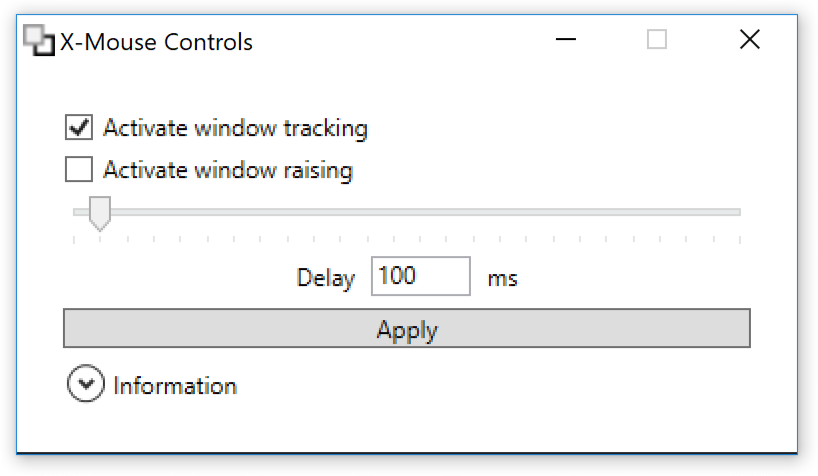
The main window of X-Mouse Controls v1.1.0.0, running on Windows 10.
Historical screenshots
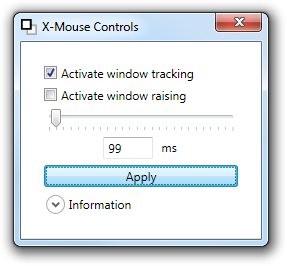
The main window of X-Mouse Controls v1.0.1.0, running on Windows 7.
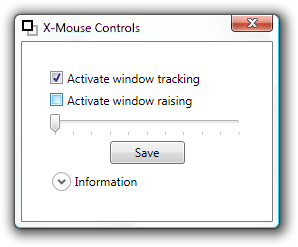
The main window of X-Mouse Controls v1.0.0.0, running on Windows Vista. (Perhaps Windows 7?)
Features
Active window tracking
Enable to give focus to windows by moving your cursor over them, known as focus follows mouse. Obeys the delay described below.
If disabled (default) a click is required to activate a window, known as clickfocus.
Active window raising
Enable to automatically make the active window the topmost window, known as autoraise.
If automatic window raising is disabled (default) it allows the user to type text or give commands in one window without changing the order of the other windows.
Active tracking delay
The delay in milliseconds (ms), until the window focus changes. This program allows settings from 0 milliseconds (instant focus) to 2500 milliseconds (very long delay). A value of 100—300 milliseconds is recommend to avoid windows stealing focus too fast. See usage.
Apply
Saves the settings and applies them to your system. The settings come in effect right away, and stay even after rebooting.
Usage, tips, and workarounds
X-Mouse Controls does not require installation. You only need to run it once to change settings; all applied changes are persisted immediately.
If windows and menus disappear before using them, try increasing the delay. A delay of 100—300 milliseconds is recommended, depending on how fast you move the mouse cursor.
To work around some window raising and menu problems, click and hold your left mouse button on an empty (unresponsive) area, drag the cursor to where you want to focus, and let go.
Active window raising can be problematic when some programs/windows completely overlap others, especially in combination with a low delay. Try turning off active window raising.
If using a Microsoft Account to log in to Windows, the active window tracking settings are synchronized to other machines using the same account. This is because the settings are part of Windows, and X-Mouse Controls merely lets you conveniently change them.
X-Mouse Controls is competely free! You even get the source code for free. To develop open source software is not without cost though — it takes technical knowledge, time, and effort.
You don't have to be a developer to support my open source work! Sending a link to a friend, or posting on social media, helps as well. If you want to receive personal support, or just feel all warm and fuzzy inside from helping open source development, donations are very welcome. There is no predefined price — you pay what you want.
In order to avoid X-Mouse Controls being buried below other windows while experimenting with the settings, it will always stay on top of other windows. Minimize first to test window raising.
Uninstallation is easy — just delete the X-Mouse Control files. Optionally run the program to turn off active window tracking first, as the settings are persisted automatically by Windows.
What is known as x-mouse on Windows is different from Xmouse on other systems, such as Unix and Linux variants. On Windows, it is closer to the X Window System (X11) setting focus follows mouse (FFM) or focus follows pointer.
If you use a version of Windows released prior to Windows Vista, it is recommended to use Tweak UI, found in Microsoft PowerToys and the related powertoy Microsoft Xmouse 1.2.
To work on X-Mouse Controls, Microsoft Visual Studio is required. It is easy to run a complete developer setup in a virtual machine, freely available from Microsoft.
As an alternative to manual zip file unpacking, install the Chocolatey package: choco install xmouse-controls
Downloads are signed using Joel Purra's OpenPGP key4C47B4FF173AE6ED0DB733946DF6890D2A977668. To verify the authenticity, use an OpenPGP-compliant tool such as GNU Privacy Guard (GnuPG, GPG).
Can run on Windows 10 without downloading .NET Framework 3.5. Both requested in #11 and fixed in #12 by Nathan Phillip Brink, thank you!
More usage information and tips in the main window.
Reflect system settings changes in the X-Mouse Controls window.
Update icon to depict a focused window below an unfocused window (instead of a focused window on top of an unfocused window). Graphics were updated by Miroslava Jovičić, thank you!
X-Mouse Controls is using system calls from SystemParametersInfo in user32.dll, especially SPI_GETACTIVEWINDOWTRACKING, SPI_GETACTIVEWNDTRKZORDER,
SPI_GETACTIVEWNDTRKTIMEOUT.
The Windows control panel offers you to enable/disable x-mouse, but not to tweak it. Use X-Mouse Controls instead.
Enter Ease of Access Center (shortcut Win+U)
Click Change how your mouse works
Enable Activate a window by hovering over it with the mouse
Registry hacks
Direct editing of the registry for x-mouse values is considered a bad thing, as there are API calls which do this correctly and apply the results right away — with X-Mouse Controls there is no need to log out and in, or restart your computer. The following words are only here to help others searching for a tool that makes an inactive window active by hovering: HKEY_CURRENT_USER\Control Panel\Mouse\ActiveWindowTracking, HKEY_CURRENT_USER\Control Panel\Desktop\ActiveWindowTracking, HKEY_CURRENT_USER\Control Panel\Desktop\ActiveWndTrkTimeout, HKEY_CURRENT_USER\Control Panel\Desktop\UserPreferencesMask, REG_DWORD, REG_BINARY.
X-Mouse settings do not "stick" [Thank you Joel Purra (e-mail removed)!]: TweakUI's Mouse tab -> "Activation follows mouse (X-Mouse)" box checked, and: TweakUI's General tab -> "X-Mouse AutoRaise" and "Mouse hot tracking effects" boxes checked. This can be fixed in some cases (reminiscent from the old XMouse MS Power Toy 95) by adding/changing these Win.ini entries under the [XMouse] section:
Edit Win.ini (located in your Windows folder) with Notepad or Sysedit. Change any of these lines from 1 to 0 or back, and then restart Windows to see if it works. See "ACTIVE WINDOW TRACKING" in REGISTRY.TXT (included) to learn how to properly activate/fix X-Mouse settings used by TweakUI.